Build personal website and host it on github so that both I and other readers can easily access the content
1. Using Hugo with Gokarna as the theme
a. Follow the Gokarna tutorial to install GO, HUGO, and git
b. Create the project and install Gokarna theme
hugo new site my-website
cd my-website
git init
git submodule add https://github.com/gokarna-theme/gokarna-hugo.git themes/gokarna
c. Fill in configuaration file
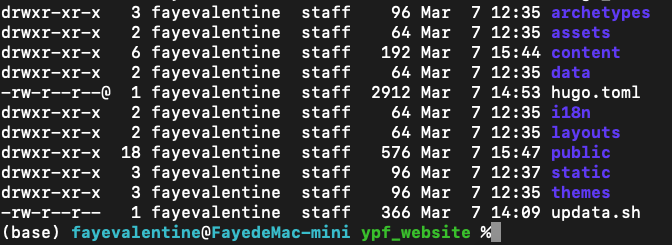
>>cat hugo.toml
baseURL = "https://astudentfromsustech.github.io/"
title = "Not a Peeker of Nature"
theme = "gokarna"
languageCode = "en"
defaultContentLanguage = "en"
enableEmoji = true
enableRobotsTXT = true

# Choose one of emacs, trac or perldoc
pygmentsStyle = "monokai"

[params]
footer = "Pengfei Yin"
description = "Genomics | Computational Biology | Physics"
avatarURL = "/images/avatar.jpg"
AvatarAltText = "avatar"
avatarSize = "size-l"
showPostsOnHomePage = "recent"
ShowBackToTopButton = true # true or false for "back to top" button on posts
customHeadHTML = """
    <!-- KaTeX -->
    <link rel="stylesheet" href="https://cdn.jsdelivr.net/npm/katex@0.16.0/dist/katex.min.css" integrity="sha384-Xi8rHCmBmhbuyyhbI88391ZKP2dmfnOl4rT9ZfRI7mLTdk1wblIUnrIq35nqwEvC" crossorigin="anonymous">
    <script defer src="https://cdn.jsdelivr.net/npm/katex@0.16.0/dist/katex.min.js" integrity="sha384-X/XCfMm41VSsqRNQgDerQczD69XqmjOOOwYQvr/uuC+j4OPoNhVgjdGFwhvN02Ja" crossorigin="anonymous"></script>
    <script defer src="https://cdn.jsdelivr.net/npm/katex@0.16.0/dist/contrib/auto-render.min.js" integrity="sha384-+XBljXPPiv+OzfbB3cVmLHf4hdUFHlWNZN5spNQ7rmHTXpd7WvJum6fIACpNNfIR" crossorigin="anonymous"></script>
    <script>
    document.addEventListener("DOMContentLoaded", function() {
        renderMathInElement(document.body, {
        // customised options
        // • auto-render specific keys, e.g.:
        delimiters: [
            {left: '$$', right: '$$', display: true},
            {left: '$', right: '$', display: false},
        ],
        // • rendering keys, e.g.:
        throwOnError : false
        });
    });
    </script>
"""
socialIcons = [
    {name = "github", url = "https://github.com/astudentfromsustech"},
    {name = "twitter", url = "https://twitter.com/Pengfei_Yin_"},
    {name = "email", url = "12133074@mail.sustech.edu.cn"}
]
metaKeywords = ["blog", "gokarna", "hugo"]

[menu]
[[menu.main]]
    name = "Home"
    pre = "<span data-feather='home'></span>"
#   url = "https://astudentfromsustech.github.io/"
    url = "/"
    weight = 1

[[menu.main]]
    name = "Posts"
    pre = "<span data-feather='book'></span>"
#   url = "https://astudentfromsustech.github.io/posts/"
    url = "/posts/"
    weight = 3

[[menu.main]]
    name = "Projects"
    pre = "<span data-feather='code'></span>"
#   url = "https://astudentfromsustech.github.io/projects/"
    url = "/projects/"
    weight = 4

[[menu.main]]
    name = "Tags"
    pre = "<span data-feather='tag'></span>"
#   url = "https://astudentfromsustech.github.io/tags/"
    url = "/tags/"
    weight = 5

[[menu.main]]
    name = "Abouts"
    pre = "<span data-feather='users'></span>"
#   url = "https://astudentfromsustech.github.io/about/"
    url = "/abouts/"
    weight = 2

[markup]
[markup.tableOfContents]
    startLevel = 1
    endLevel = 4
    ordered = false
d. Launching the Website Locally
hugo server
2. Host the public diretory on github using a seperate branch
a. Generate the SSH Key
ssh-keygen -t ed25519 -C "your_email@example.com
b. Add your SSH key to the agent
# for Ed25519 key, if you’re using RSA, use the corresponding file (e.g., ~/.ssh/id_rsa).
ssh-add ~/.ssh/id_ed25519
c. Add your public key to GitHub
# copy the content of ~/.ssh/id_ed25519.pub or ~/.ssh/id_rsa.pub
pbcopy < ~/.ssh/id_ed25519.pub # or  pbcopy < ~/.ssh/id_rsa.pub
# paste the public key to the “Key” field (click the New SSH key in GitHub SSH Settings)
d. Keep public in a separate branch (Another choice is to directly push the public directory)
# Remove the .git Folder in public
cd /Users/fayevalentine/Desktop/tools/tools_2_hugo/hugo/ypf_website/public
rm -rf .git

# Clone Your GitHub Pages Repository Locally
cd ~/repos
git clone git@github.com:astudentfromsustech/astudentfromsustech.github.io.git

# Copy the generated public directory to the repository root
cd astudentfromsustech.github.io
cp -R /Users/fayevalentine/Desktop/tools/tools_2_hugo/hugo/ypf_website/public/* .

# Commit and Push the Files
git add .
git commit -m "Publish Hugo site: update GitHub Pages site"
git push -u origin master